> For the complete documentation index, see [llms.txt](https://docs.adx3.io/llms.txt). Markdown versions of documentation pages are available by appending `.md` to page URLs; this page is available as [Markdown](https://docs.adx3.io/copy-of-cn/yong-hu-cao-zuo-shou-ce/yong-hu-cao-zuo-shou-ce-dspfacebook/san-chan-pin-guan-li/3.7-fei-yong-ming-xi.md).
# 3.7 费用明细
**费用明细:**展示明细包括代投广告消耗、自投广告消耗、订单资金、代投明细、投手佣金。
**详细说明**
| 类别名称 | 说明 | 示意图 |
| ------ | ---------------------------------------------------------- | --------------------------------------------------------------------------------------------------------------------------------------------------------------------------------------------------------------------------------------------------------- |
| 代投广告消耗 | 可以查看每日代投订单的广告消耗 |  |
| 自投广告消耗 | 可以查看每日自投广告的广告消耗 |
|
| 自投广告消耗 | 可以查看每日自投广告的广告消耗 | 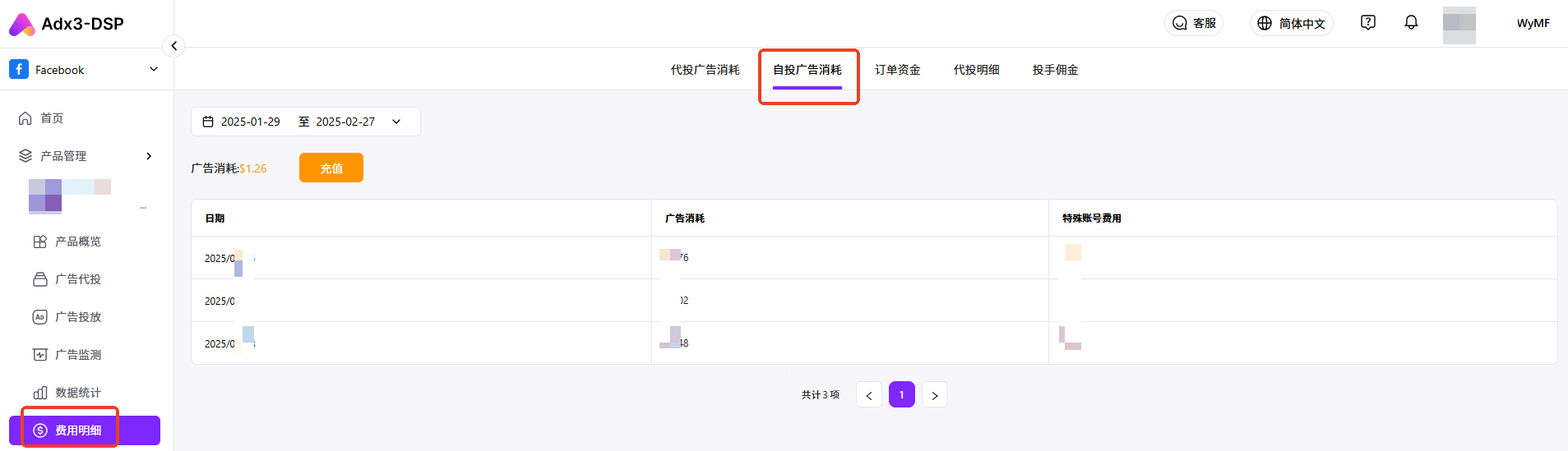 |
| 订单资金 | 可以查看代投订单资金情况,包括订单总额、投放可用资金、消耗金额、剩余返还账户金额以及每笔代投订单的资金相关费用数据。 |
|
| 订单资金 | 可以查看代投订单资金情况,包括订单总额、投放可用资金、消耗金额、剩余返还账户金额以及每笔代投订单的资金相关费用数据。 |  |
| 代投明细 | 可以查看代投订单的金额明细 |
|
| 代投明细 | 可以查看代投订单的金额明细 |  |
| 投手佣金 | 可以查看投手佣金明细 |
|
| 投手佣金 | 可以查看投手佣金明细 |  |
**Q:每日广告消耗在哪里看?**
A:点击***\[费用明细]***,其中"**代投广告消耗**“是每日代投订单的广告消耗费用,不含购买账号费用和特殊账号(\[三不限]账号)手续费。“**自投广告消耗**”是每日自投广告的消耗。
**Q:代投订单充值退款的资金明细可以在哪里看?**
A:点击***\[费用明细],***其中“**代投明细**"可以查看充值退款的资金明细,在页面中,你还可以输入订单名称或订单编号,查看这个订单所有的充值退款资金。
**Q:付给投手的佣金可以在哪里看?**
A:你可以在订单详情中査看每个订单的金额,也可以点击***\[费用明细]***的“**投手佣金**”中查看。
|
**Q:每日广告消耗在哪里看?**
A:点击***\[费用明细]***,其中"**代投广告消耗**“是每日代投订单的广告消耗费用,不含购买账号费用和特殊账号(\[三不限]账号)手续费。“**自投广告消耗**”是每日自投广告的消耗。
**Q:代投订单充值退款的资金明细可以在哪里看?**
A:点击***\[费用明细],***其中“**代投明细**"可以查看充值退款的资金明细,在页面中,你还可以输入订单名称或订单编号,查看这个订单所有的充值退款资金。
**Q:付给投手的佣金可以在哪里看?**
A:你可以在订单详情中査看每个订单的金额,也可以点击***\[费用明细]***的“**投手佣金**”中查看。